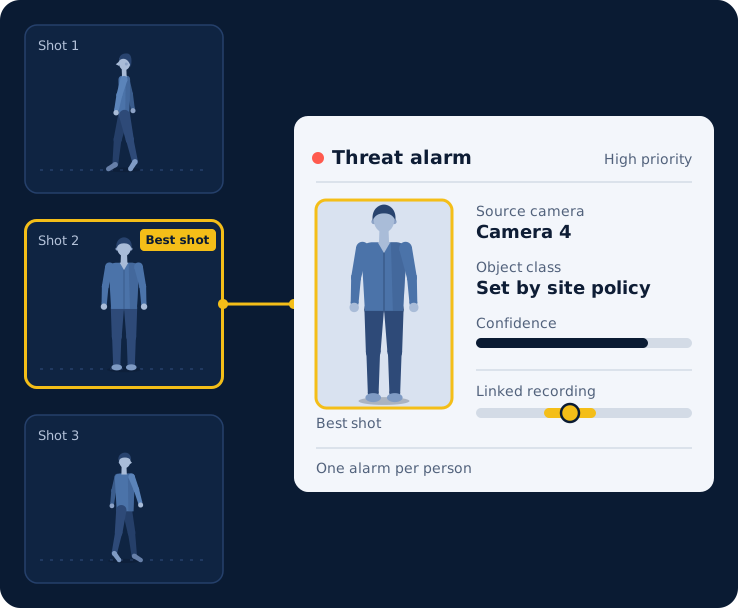

Three shots of one person, with the best shot attached to the alarm. Illustration.
Real-Time AI Video Analytics for Milestone XProtect
Axelera AI Video Analytics for Milestone XProtect® tracks each person, raises an alarm when someone carries an object your site ranks as a threat, and posts it to the XProtect alarm list with the evidence attached. Your cameras, recordings and views stay as they are.

Verified with XProtect Corporate 2026 R1
Verification applies to this version.

Three shots of one person, with the best shot attached to the alarm. Illustration.
Alarms in the XProtect alarm list
Operators stay in the Smart Client they already know. There is no new client to learn.

Works with the cameras you have
It takes standard RTSP streams from the IP cameras already added to XProtect.

No load on the recording server
Cameras stream to XProtect and to the analytics host independently.

Every alarm arrives with the evidence attached
Operators can verify before they dispatch. The picture, the detection data and the link to the recording travel with the alarm.
Detects weapons and threats automatically
When a tracked person carries an object of a class your site ranks as a threat, a High-priority alarm opens with no operator action. Threat classes follow your site's own object policy.

Lets operators mark a person of interest
Right-click or drag a person on the analytics video wall and a Medium-priority alarm opens in XProtect at once.

Follows one person while in view
The tracker gives each person one identity for as long as the camera sees them.

Attaches evidence to every alarm
A clean best-shot picture without overlays, cropped from the camera's full-resolution video, plus up to three improved pictures as the person moves. Bounding box, confidence and object class are in every alarm's detection data.

Links each alarm to the recording
Each alarm is sourced to the camera where the person was seen.

Keeps the alarm list quiet
One alarm per person, closed when they leave view. A bag alone does not raise an alarm, and a short grace period stops alarms from flickering open and closed.
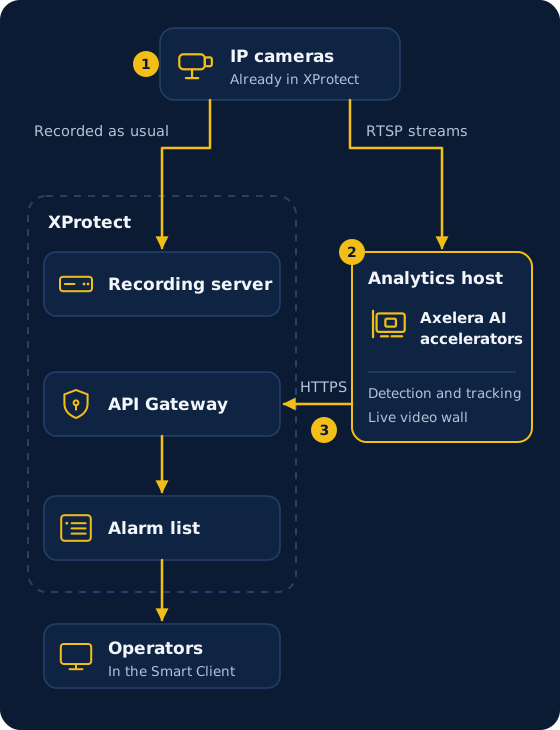
How it fits into your XProtect system
A dedicated analytics host sits beside XProtect. Your cameras, recordings and views stay as they are.
-
Cameras stream to XProtect and the analytics host
Your cameras keep streaming to XProtect as they do today. The analytics host takes standard RTSP streams from the same cameras separately, so the recording server carries no extra load. -
The analytics host detects and tracks
It runs detection and tracking on Axelera AI accelerators and shows live results on its own video wall. -
Alarms arrive in XProtect
The host posts alarms to the XProtect alarm list over one HTTPS connection through the XProtect API Gateway. XProtect remains the system of record, and operators handle these alarms like any other.
What it takes to deploy
A dedicated analytics host, the cameras you already have, and one connection to XProtect.
XProtect
Talk to our team
Tell us about your XProtect system and what you want to detect. If you are a system integrator, tell us that too.
It helps to include:
- Your XProtect version
- What you want your operators to see